Find Your Team Productivity App: Solve Real Problems
Avoid wasting money on the wrong team productivity app. This guide helps you diagnose bottlenecks & select the perfect tool for your team's needs.
Most advice about picking a team productivity app is backward. It starts with feature grids, pricing tables, and “top tools” lists. That's how teams end up paying for a polished platform that never fixes the actual bottleneck.
The hard truth is simple. A new app won't rescue a team that hasn't named its real problem. If deadlines slip because nobody sees dependencies, you need coordination. If work stalls because information lives in chat, you need structure. If everyone agrees on what to do but still doesn't do it consistently, you don't have a project management problem. You have a follow-through problem.
That distinction matters more than most software buyers admit. A widely cited Gallup-based estimate says only 21% of workers globally were engaged at work, and that low engagement was associated with $438 billion in lost productivity in 2024. The same estimate says raising engagement could add $9–10 trillion to global GDP, which shows how large the coordination and motivation problem really is, according to Archie's summary of the Gallup-based findings.
Table of Contents
- Why Your Team Productivity App Might Be the Problem
- Decoding the Four Types of Productivity Apps
- Match App Features to Your Team's Actual Goals
- The Missing Piece The Power of Habit-Driven Productivity
- Productivity Apps in Action Three Team Scenarios
- How to Choose and Launch Your First Team App
- Conclusion Building Systems Not Just Buying Software
Why Your Team Productivity App Might Be the Problem
A team productivity app can create as much drag as it removes. I've seen teams buy an all-in-one platform because it looked mature, only to discover that nobody wanted to update it, nobody trusted the dashboards, and half the actual work still happened in Slack, email, or spreadsheets.
That failure usually comes from a mismatch, not bad intent. Teams shop for software as if “productivity” were one thing. It isn't. The category is broad, and your team's issue might be project complexity, communication breakdown, missing documentation, or weak daily execution.
The tool can hide the real issue
If your team needs a simple daily accountability loop, a heavyweight work operating system can feel like forcing people to file paperwork before they're allowed to act. If your team runs cross-functional launches with dependencies, a chat tool won't save you. Faster messaging just helps people discuss confusion in real time.
Practical rule: If people already know what to do but don't do it consistently, adding more planning features usually makes the problem worse.
The biggest mistake is assuming low output always means poor planning. Sometimes output is low because work is emotionally easy to postpone. Prospecting, writing, training, documenting, follow-ups, and admin hygiene all suffer from that pattern. The task is clear. The resistance is behavioral.
Software should fit the workflow
A good team productivity app makes the right action easier than the wrong one. That means different things in different contexts:
- For project teams: Clear ownership, deadlines, dependencies, and visibility.
- For communication-heavy teams: Fast escalation, organized channels, and searchable decisions.
- For knowledge-heavy teams: Reliable documentation and a shared source of truth.
- For routine-driven teams: Lightweight check-ins, visible consistency, and social accountability.
Teams don't need a miracle tool. They need a tool that fits the kind of friction they face each day. That's a much smaller and more useful buying decision.
Decoding the Four Types of Productivity Apps
Choosing a productivity app is like selecting the right tools for a specialized workshop, each designed for a specific purpose to build success.
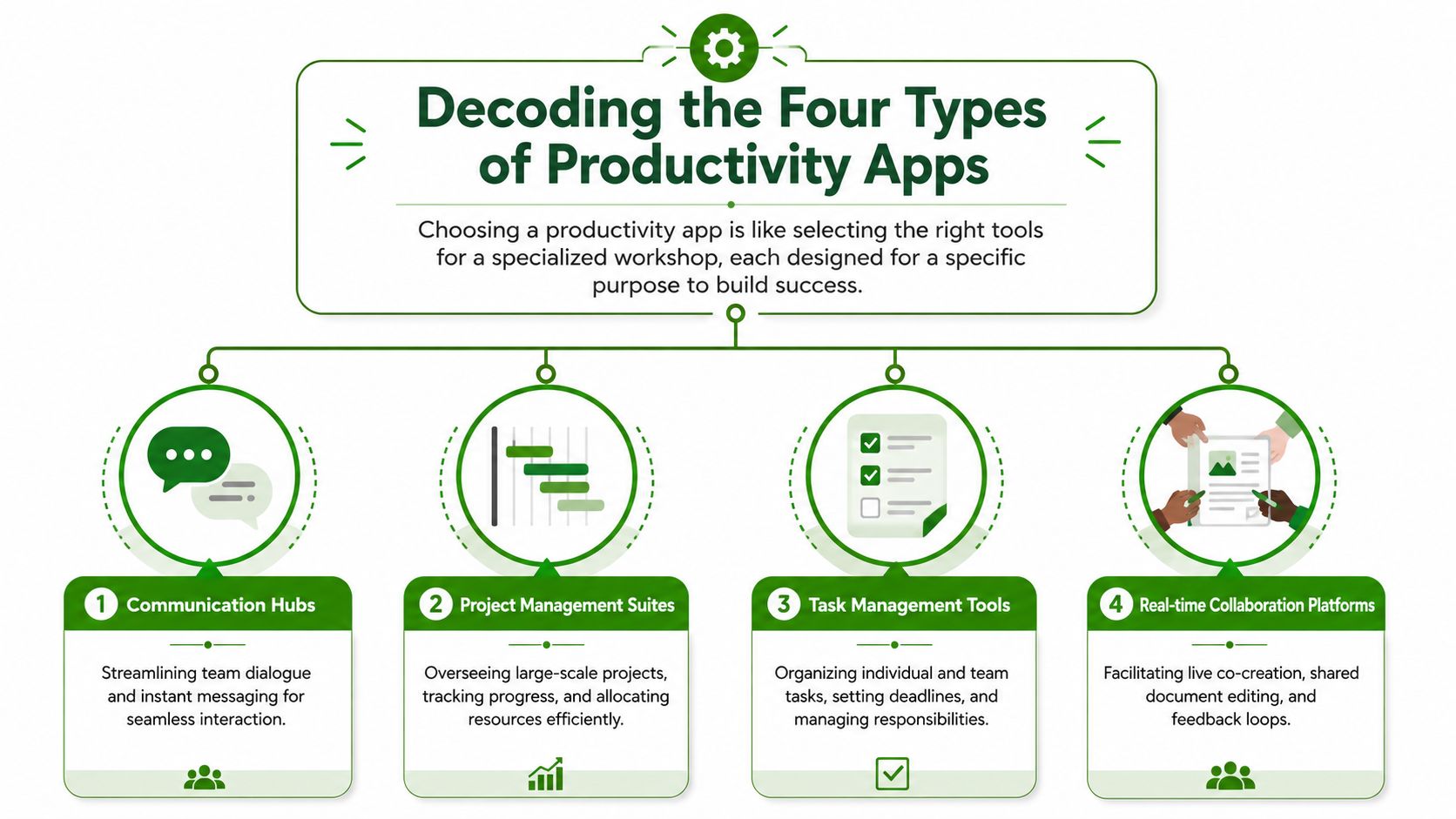
The phrase team productivity app sounds tidy, but the market is anything but. In a 2026 market snapshot, productivity apps generated $32.5 billion in revenue in 2024, with office suite apps alone accounting for $19 billion, which tells you how wide this category has become across collaboration, storage, workflow, and communication, as shown in Business of Apps' productivity app market snapshot.
Stop comparing unlike tools
Teams waste time when they compare Asana to Slack as if one is supposed to replace the other, or when they compare Notion to a habit tracker as if both are solving the same operational problem. They aren't.
A better mental model is this: don't ask which app is best. Ask what kind of work failure you're trying to prevent.
The four categories that matter
Project and task managers
These tools organize work that has owners, deadlines, dependencies, and moving parts. Think Asana, Monday, Trello, or ClickUp. They're useful when work spans multiple people and sequence matters.
They're less useful when the actual issue is not planning but repetition. A project board can track “daily outreach,” but it won won't automatically make anyone want to do it every day.
Communication and collaboration hubs
Slack, Microsoft Teams, and similar tools solve speed. They help teams coordinate quickly, especially when work changes fast or issues need escalation.
Their weakness is durability. Chat is a poor long-term system for commitments, process memory, and routine adherence. Important work disappears into scroll.
Knowledge management systems
Notion, Confluence, and internal wikis act as the team's library. They capture operating procedures, meeting notes, and shared context.
These systems are critical when teams keep asking the same questions. They don't replace execution tools, though. A clean wiki doesn't make people follow the process it describes.
Habit and accountability platforms
This category gets ignored in mainstream roundups, even though many teams struggle most with repeated daily actions. These tools are for recurring behaviors, not sprawling projects. They work best when the goal is consistency rather than orchestration.
A lot of “productivity” problems are really consistency problems wearing project-management clothes.
That's why category clarity matters. A six-month implementation plan, a live incident response channel, a central company wiki, and a shared habit check-in loop all belong to different software families. Treating them as interchangeable is how buyers end up disappointed.
Match App Features to Your Team's Actual Goals
Most software demos are built to impress, not diagnose. A polished dashboard can make weak software look strategic. The better approach is to tie features directly to the failure pattern your team wants to fix.
Start with the failure point
Ask where work breaks down in practice. Not in theory. In practice.
If a marketing team keeps missing launch dates because design depends on copy and copy depends on approvals, you need dependency management and timeline visibility. If a support team misses updates because information is buried across threads, you need structured communication and searchable context. If a sales team agrees that daily outreach matters but momentum dies by Wednesday, you need recurring accountability.
Here's the simplest way to evaluate a team productivity app:
- Look for operational fit: Does the app match how the work happens?
- Check update burden: Will people maintain it without being chased?
- Test visibility: Can a manager or teammate see what matters quickly?
- Watch for friction: Does the tool add admin steps before useful action happens?
- Separate planning from persistence: A good planner is not automatically a good habit system.
A lot of teams also benefit from defining what progress should look like before buying. If you need help setting that up, this guide on how to track progress is a useful way to think about measurable follow-through without overcomplicating the process.
You already know you can change.
You just need to take the first step. Habit Huddle helps you build habits around your goals, alongside friends who keep you accountable.
Productivity App Feature Matrix
| Team Problem | Essential Features | App Category |
|---|---|---|
| Cross-functional projects keep slipping | Task dependencies, timeline or Gantt view, owner assignment, milestone tracking | Project management suite |
| Team communication is fast but chaotic | Threaded conversations, channel structure, searchable history, alerts | Communication hub |
| People can't find decisions or SOPs | Shared docs, wiki structure, permissions, templates, search | Knowledge management system |
| Daily routines start strong and fade | Recurring check-ins, streak visibility, public accountability, low-friction logging | Habit and accountability platform |
| Individual tasks are scattered | Simple task lists, due dates, reminders, lightweight organization | Task management tool |
| Real-time co-creation is clumsy | Shared editing, comments, version visibility, collaborative documents | Real-time collaboration platform |
Don't ask whether a feature exists. Ask whether your team will use it under normal pressure.
That's the part buyers skip. They see a feature list and assume capability equals adoption. It doesn't. The best feature in the wrong workflow is shelfware.
What works and what usually doesn't
A few patterns show up again and again:
- Works well: One app chosen for one clear bottleneck.
- Usually fails: A broad rollout justified by “standardization” before teams agree on the problem.
- Works well: Tools that reduce decisions during the workday.
- Usually fails: Tools that require disciplined manual upkeep from people who are already overloaded.
- Works well: Systems with visible accountability.
- Usually fails: Private task lists for behaviors that need social reinforcement.
That last point is where many teams gradually lose momentum. Shared goals often need shared visibility.
The Missing Piece The Power of Habit-Driven Productivity
Most team productivity software is built around projects, messages, and documentation. That covers planning. It doesn't fully address persistence.
Why behavior breaks most systems
Existing coverage of productivity tools underexplains behavioral sustainability. The conversation usually centers on collaboration, automation, and flexibility. It says much less about consistency mechanics, social reinforcement, and how teams keep showing up after the novelty wears off. That gap is highlighted in RingCentral's discussion of productivity software and remote work.
That's why many rollouts feel successful for a week and stale by month two. The software may be functional. The human loop isn't.
A manager can create a recurring task for “prospect daily,” “log customer notes,” “publish training recap,” or “review pipeline.” None of that guarantees the habit survives a busy day. Once the team falls behind, a lot of tools display the failure more neatly.
What low-friction accountability looks like
For repeat daily behaviors, the useful question is not “Can this app track it?” Almost any app can. Rather, the question is “Does this app make consistency easier to maintain?”
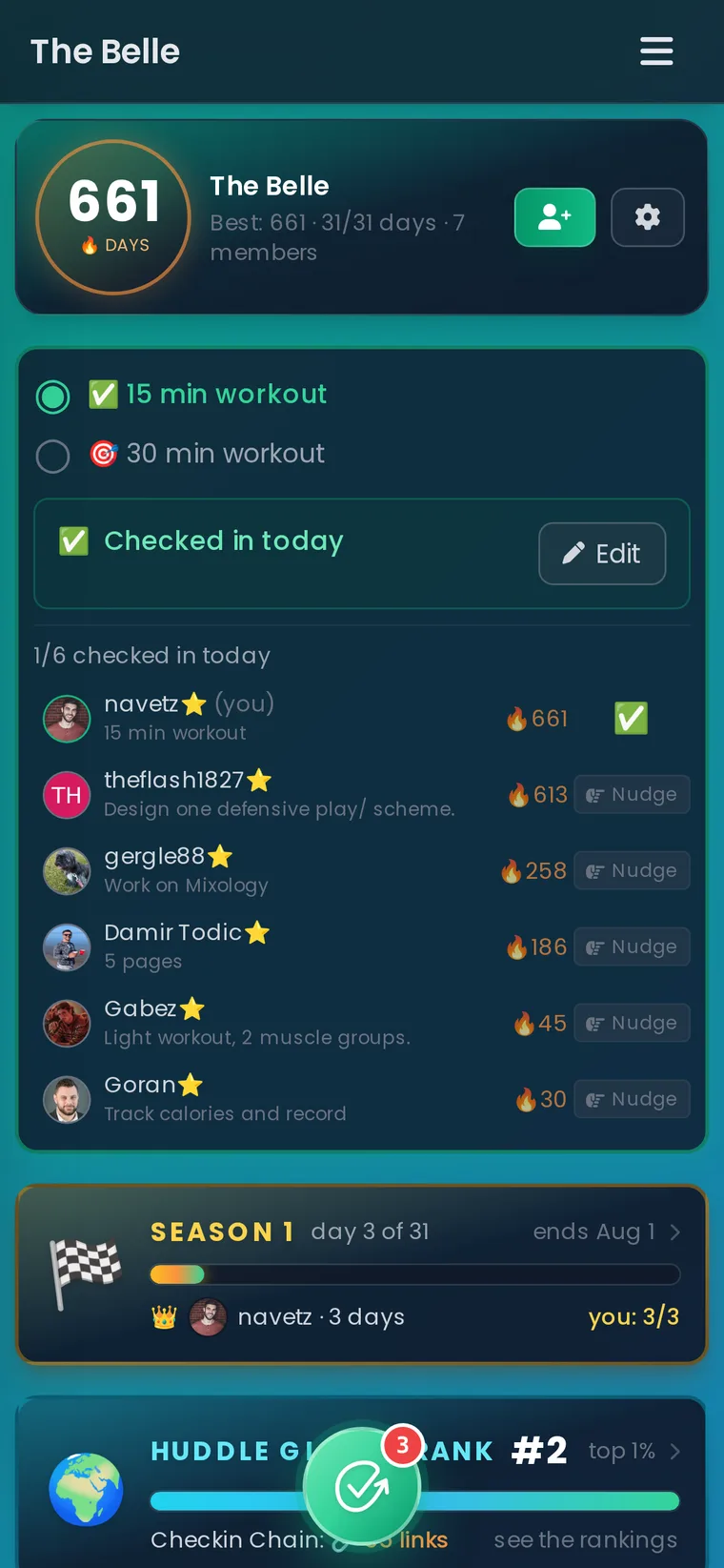
That's where a lighter structure works better. A tool like Habit Huddle's accountability partner app is built around small-group check-ins, visible streaks, and simple daily adherence rather than project complexity. That makes it a different kind of team productivity app. It's suited to routines such as outreach, writing, study, hydration, training, or other behaviors where steady repetition matters more than elaborate workflow design.
A few design choices matter a lot here:
- Visible streaks: People protect momentum when they can see it.
- Minimum viable check-ins: Teams stay engaged longer when a rough day doesn't destroy the whole system.
- Shared accountability: Public progress creates gentle pressure that a private to-do list can't.
- Low setup cost: If logging progress feels like admin work, people stop.
Here's a quick walkthrough of the kind of experience teams are responding to in this category:
The mistake many leaders make is trying to force daily habits into software designed for one-off deliverables. It can work, but it often creates friction, not traction.
Productivity Apps in Action Three Team Scenarios
Abstract advice only gets you so far. The easiest way to choose a team productivity app is to look at the type of work in front of you and ask what failure would hurt most.

A launch team with dependency problems
A creative agency is preparing a product launch. Copy depends on positioning. Design depends on approved copy. Paid media depends on final assets. Client review sits in the middle of everything.
That team needs a project system like Asana, Monday, or ClickUp. A board alone isn't enough. They need timelines, ownership, and dependency visibility so one delayed handoff doesn't surprise everyone on Thursday afternoon.
What works here is rigid clarity. What fails is trying to coordinate a launch inside chat and hoping people remember deadlines.
A support team that needs live coordination
A remote customer support team handles incidents across time zones. They need quick escalation, rapid updates, and clear ownership during active issues.
Slack or Microsoft Teams fits better than a heavyweight project suite for that live layer. The key is disciplined channel design and explicit escalation habits. Without those, fast communication becomes noisy communication.
The right tool often solves only half the problem. The other half is whether the team agrees on how to use it.
For remote groups trying to create steadier routines around check-ins and handoffs, a focused setup like this guide to a habit tracker for remote teams can be useful alongside communication tools.
A business development team that needs consistency
Now take a business development team. Their issue isn't that they lack a CRM, task list, or shared chat. Their issue is that outreach activity starts strong and then drops when calendars fill up, deals get emotional, or rejection piles up.
General-purpose task software usually underperforms here. It can assign “send outbound messages” as a recurring task, but it doesn't create much social reinforcement. People can ignore the task unnoticed.
A habit-driven tool changes the social environment. Team members check in daily, see who stayed consistent, and feel the nudge of public follow-through. That doesn't replace the CRM. It supports the behavior that keeps the pipeline alive.
The lesson across all three scenarios is simple. Different bottlenecks need different systems. When buyers lump all of them under “productivity,” they usually pay for the wrong thing.
How to Choose and Launch Your First Team App
The first rollout shouldn't be a software migration project disguised as progress. Keep it tight. Choose one problem, one group, and one clear success condition.
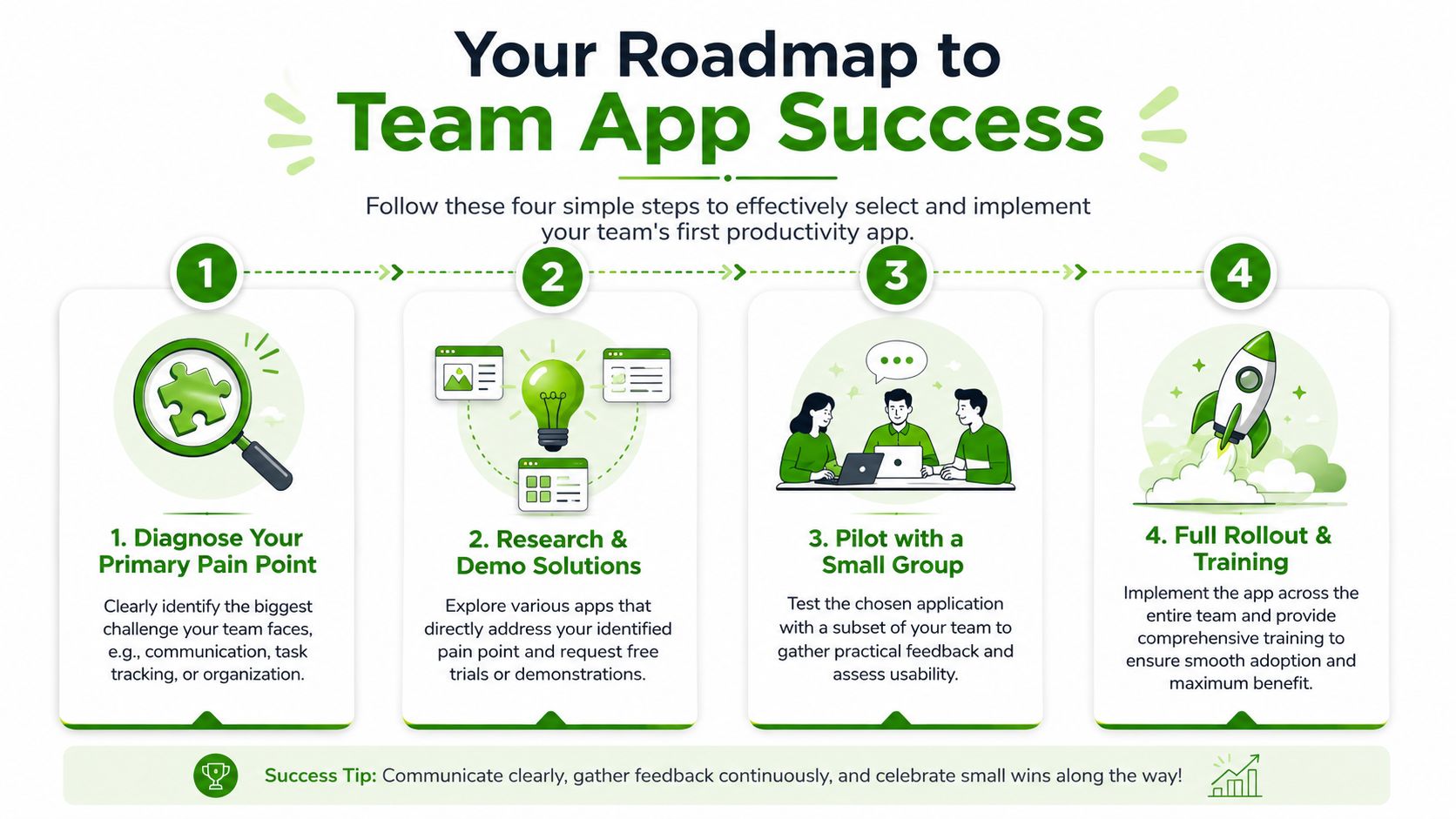
A lot of public advice still treats productivity like a bundle of features instead of a diagnosis problem. The more useful question is whether your team needs coordination software or a lighter accountability system for repeat behaviors, a distinction noted in Shift's guide to team productivity apps.
A rollout process that doesn't create tool fatigue
Name the primary pain point
Pick the one issue that causes the most friction right now. Missed handoffs. Chaotic communication. Weak daily consistency. Don't try to solve all three at once.Shortlist by workflow, not brand popularity
A well-known app can still be the wrong fit. If your team's problem is repeated daily adherence, don't begin with enterprise project software just because it's familiar.Pilot with a small group
Start with the people closest to the problem. They'll tell you fast whether the app reduces friction or adds ceremony.Train around behavior, not buttons
Teams don't need a tour of every menu. They need to know when to use the tool, what belongs there, and what “good use” looks like each day.
What to watch during the pilot
Don't judge the pilot by enthusiasm during the demo. Judge it by behavior after the second week.
Watch for these signals:
- Natural usage: Are people updating the app without reminders?
- Cleaner decisions: Is it easier to tell who owns what?
- Less duplicate work: Are fewer tasks getting lost between tools?
- Lower resistance: Does the app feel lighter than the old workaround?
- Visible value: Can the team point to a real improvement in daily operations?
If adoption depends on one manager chasing updates, the rollout isn't working. If the team falls back to old habits the moment pressure rises, the app doesn't fit the workflow.
The best first team productivity app isn't the one with the longest feature list. It's the one your team will still be using when the novelty is gone and the workload is real.
Conclusion Building Systems Not Just Buying Software
A team productivity app is only useful when it matches the kind of work that keeps breaking. Project chaos needs coordination. Information sprawl needs communication or documentation. Repeated follow-through failures need a system built for consistency.
The goal isn't to find one app that does everything. The goal is to build a small system where each tool handles one job well. Teams get better results when they stop buying software for the category name and start choosing it for the actual problem.
If your team's bottleneck is daily follow-through rather than project complexity, Habit Huddle is worth a look. It's a social habit tracker built for small-group accountability, visible streaks, and low-friction daily check-ins across web, mobile, and Discord.
Ready to Build Habits With Friends?
Stop failing alone. Join thousands using the #1 habit tracker with friends for real accountability and lasting results.
Prefer mobile? App Store · Google Play
Related Guides
More Habit Huddle articles on building habits with accountability.

Is Sweatmates Free? 6 Free Sweatmates Alternatives (2026)
Sweatmates is free to download, but logging a workout needs a subscription. What it costs, what it does well, and six free alternatives for couples and friends.

HabitShare Alternatives: 6 Apps for Tracking Habits With Friends (2026)
Looking for a HabitShare alternative? Six social habit trackers compared by model, price, platforms, and what happens on a missed day, plus how to switch wit...

What to Do When You Miss a Workout Day: The 5-Step Comeback Plan
Missed a workout day? What one miss does to your body and habit, according to research, plus a five-step plan for the next 24 hours, when to make it up, and...