
How Does Kindle Screen Work: In-Depth Guide 2026
Discover how does kindle screen work! We explain E Ink, microcapsules, front lights, and why its unique display is so different from a tablet for reading in
You've probably had this exact moment. You pull out your phone on a bright afternoon, open an ebook, and the screen turns into a mirror. You tilt it, squint, crank up the brightness, then give up. A Kindle in that same light feels completely different. The page stays readable, the text looks calmer, and the whole experience feels oddly close to paper.
That difference is why so many people ask, how does Kindle screen work in a way that feels so unlike a phone or tablet?
The short answer is E Ink, also called electronic paper. But the useful answer is deeper. A Kindle screen doesn't work by blasting light through glowing pixels. It works by physically moving tiny black and white pigment particles into position. That one design choice changes almost everything about the reading experience, from sunlight readability to battery life to why page turns sometimes flash.
If you're trying to read more consistently, the screen matters more than commonly perceived. Friction adds up. Glare, tired eyes, and constant charging all make it easier to stop reading. A dedicated device removes some of that friction, which is one reason people who use a reading challenge app often pair it with a calmer reading setup.
Table of Contents
- The Kindle Difference You Can Feel but Not See
- Inside the Screen The Magic of E Ink Microcapsules
- How Your Kindle Draws a Page Refresh Flashes and Ghosting
- Why Kindles Are So Easy on the Eyes Front Light vs Backlight
- E Ink vs LCD A Head-to-Head Screen Comparison
- The Secret to a Kindle's Epic Battery Life
- What This Tech Means for Your Reading Habit
The Kindle Difference You Can Feel but Not See
A phone and a Kindle can show the same novel, the same sentence, even the same font size. Yet they don't feel the same in your hands or in your eyes.
On a phone, you're reading from a glowing display built to do everything. It handles video, maps, messages, games, and fast animation. That flexibility is useful, but it also means the screen is optimized for motion and brightness, not for disappearing into the background while you read.
A Kindle works the opposite way. It's specialized. It's trying to get out of the way so your brain pays attention to the words instead of the device.
A good reading screen doesn't just show text. It makes the screen itself feel less present.
That's why people often describe a Kindle with vague words like “paper-like” or “easier on my eyes.” They're noticing a real engineering difference, even if they can't name it yet. The surface behaves more like something that reflects light than something that emits it. The text looks steadier. In bright daylight, that matters immediately.
There's also a subtle psychological effect. When the device isn't buzzing, glowing like a mini TV, or begging for power every day, reading feels simpler. You pick it up, continue where you left off, and stay in the chapter longer.
What feels different in real life
- Outdoors: Text stays readable instead of washing out in glare.
- At bedtime: The screen feels gentler and less like staring into a lit panel.
- During long sessions: You spend less attention managing the device and more attention reading.
- Over weeks: Fewer little annoyances make it easier to keep the habit going.
That “invisible” difference starts inside the display itself.
Inside the Screen The Magic of E Ink Microcapsules
A Kindle page appears because the screen is moving pigment into place, not because it is blasting light at your eyes.
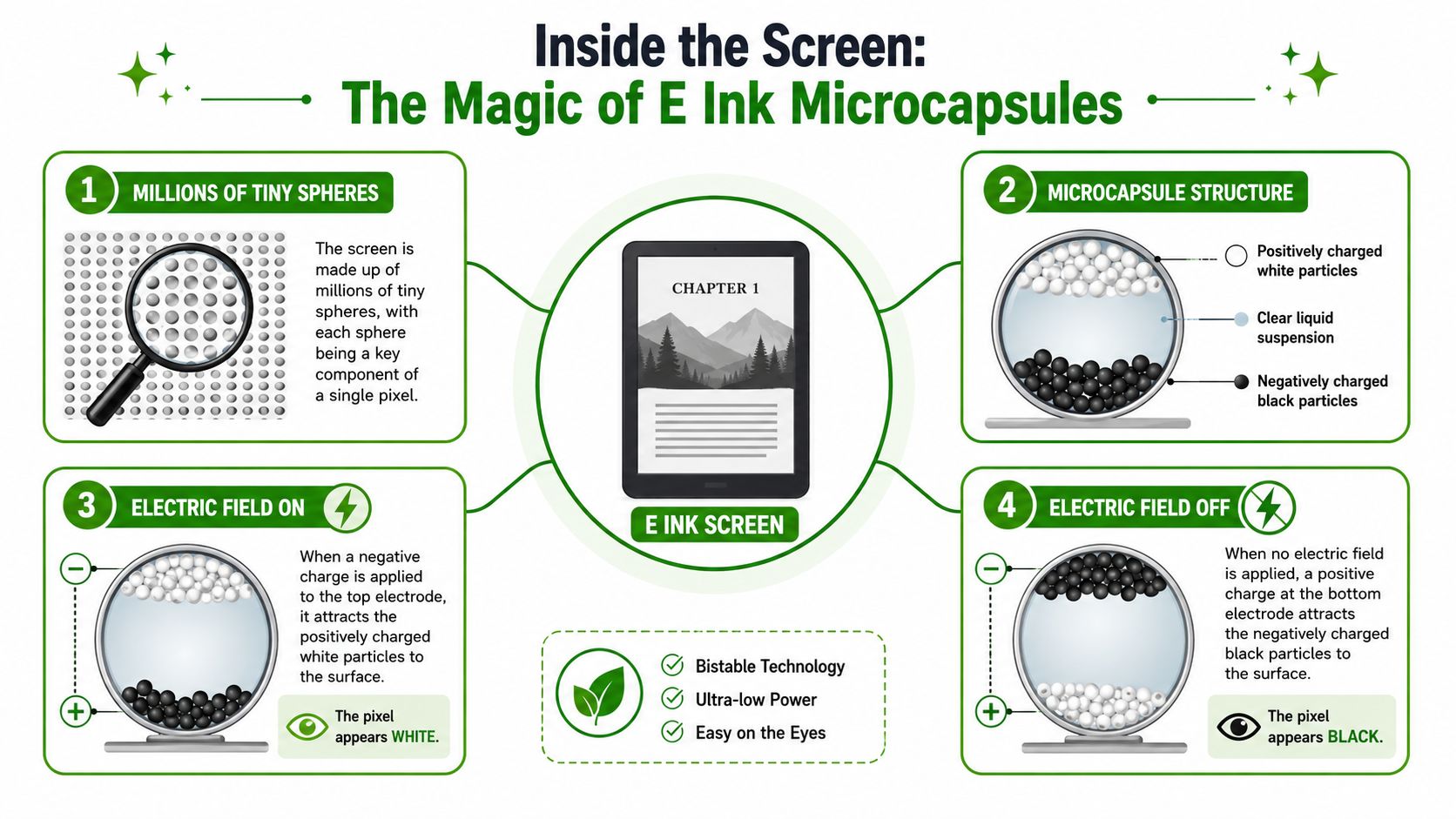
A screen made of tiny moving particles
Inside the display are countless microscopic capsules filled with fluid and two kinds of pigment particles: black and white. Those particles carry opposite electrical charges. When the Kindle applies a small electric field, one color moves toward the top of the capsule and the other drops away. The color that reaches the surface is the one you see.
A simple way to picture it is a high-tech Etch A Sketch built from tiny cells. Each cell can be told to show dark or light. Put enough of those cells together, and they form letters, punctuation, chapter headings, and simple illustrations.
That physical movement is the part many readers miss, and it explains a lot.
A phone screen creates an image by shining light through pixels. A Kindle creates an image by arranging pigment, then letting room light reveal it. Your eyes are reading reflected light off a stable surface, much closer to how you read ink on paper.
Why these microcapsules change the reading experience
This design matters because it changes what your eyes and brain deal with during a reading session.
- The text stays put. Once the particles are in position, the page can remain visible without constant redrawing.
- The screen feels quieter. You are looking at pigment resting on the page-like layer, not a panel that is always producing a bright image.
- Bright rooms help instead of hurt. More ambient light usually makes the page easier to read, the same way it helps with a printed book.
That is why Kindle text often feels steady and low-drama. The screen is doing less work while you read, so you spend less attention adapting to the device itself. For anyone trying to build a consistent reading routine, fewer little irritations make it easier to stay with the book and focus for longer reading sessions.
Why this engineering choice helps battery life and comfort
Microcapsules also explain two of the Kindle's most noticeable traits: long battery life and a gentler reading feel.
The screen mainly uses power when it changes the arrangement of particles. After a page is formed, the display can hold that image with very little energy. Engineers call this bistability, but the everyday version is simple. Your Kindle does not need to keep repainting the same sentence over and over just to keep it visible.
That choice also affects comfort. Since the display is based on reflected light, the reading experience lines up more closely with what your eyes expect from paper. The benefit is not magic. It is a direct result of how the image is made.
If you have ever wondered why a Kindle can feel less distracting than a tablet, the answer starts here. The screen is built to hold words in place, stay readable for long stretches, and get out of the way while you read.
How Your Kindle Draws a Page Refresh Flashes and Ghosting
Once you know the screen is made of tiny capsules, the next question is obvious. How does a full page appear so quickly?
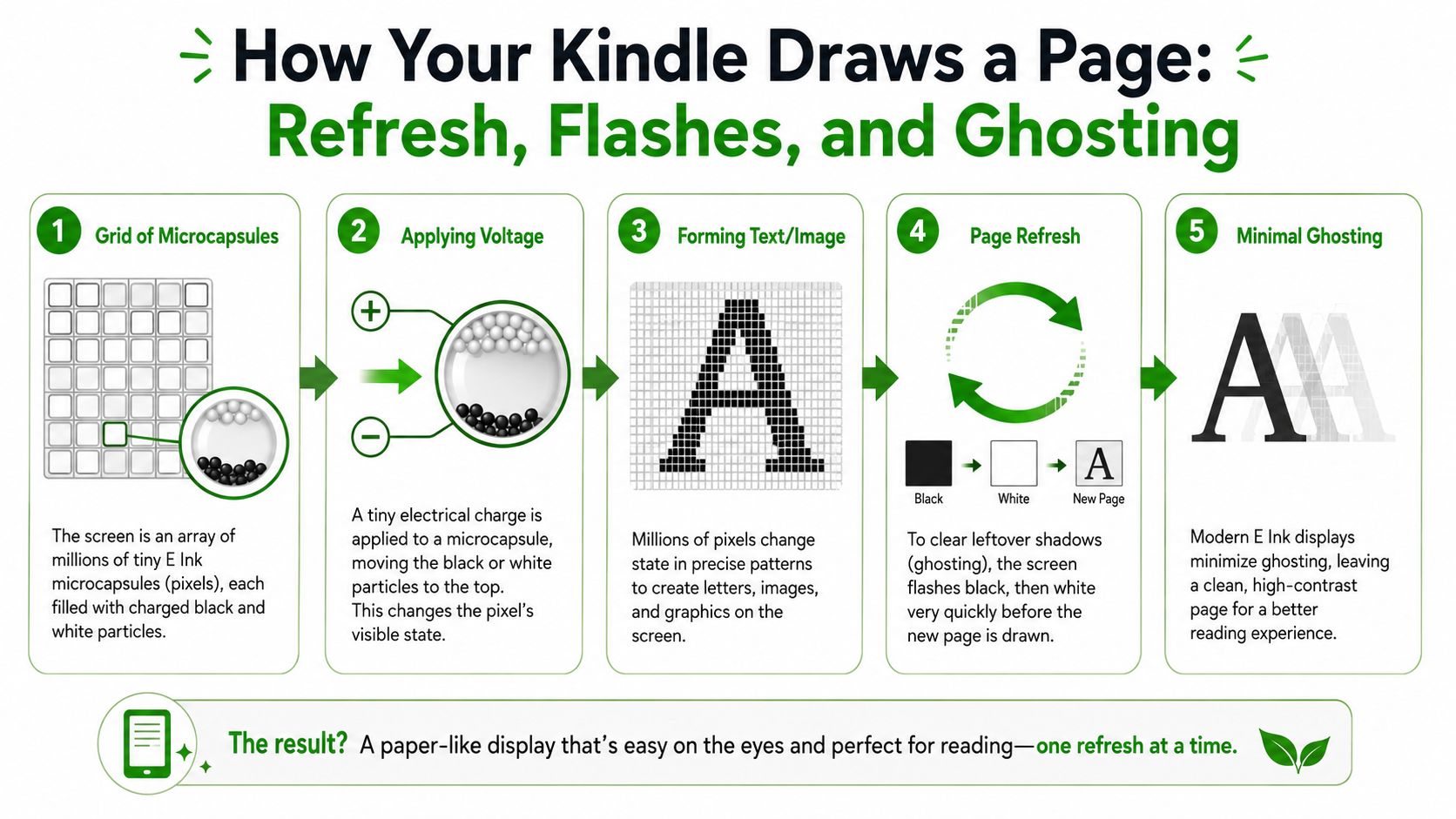
How letters appear on the page
The Kindle screen is a grid. Each small area can be controlled so it appears dark or light. When you open a book, the device sends instructions across that grid. One cluster of pixels becomes the curve of an “S.” Another becomes the dot of an “i.” Another stays blank for the page margin.
It operates like a stadium card display. No single seat shows the whole image. Each seat contributes one tiny part, and together they create a readable page.
This process works well for text because text is mostly stable. A page of a novel doesn't need to bounce, animate, or scroll like a social media app.
Here's a close look at the refresh process in action:
Why the screen sometimes flashes
That brief black or white flash on some page turns isn't a bug. It's part of the cleanup.
Because the display is physically moving pigment particles, a faint trace of the previous image can sometimes linger. That leftover trace is called ghosting. To reduce it, the Kindle may do a fuller refresh that clears the old arrangement before drawing the new page.
A simple way to picture it is a whiteboard. If you write, erase, and rewrite in the same spot over and over, you can sometimes still see a shadow of what used to be there. A stronger wipe clears it more completely. The screen flash serves a similar purpose.
Ghosting is the price of a paper-like display. The flash is the screen tidying up after itself.
What readers usually notice
- Crisper page changes: A fuller refresh helps keep text clean.
- Occasional flashes: These are maintenance, not malfunction.
- Slower feel than a tablet: The screen is moving particles, not pushing video frames.
- Better results for books than for animation: Static pages are the sweet spot.
The first time you see a refresh flash, it can seem odd. After a few chapters, most readers stop noticing it because the benefit is a steadier reading surface.
Why Kindles Are So Easy on the Eyes Front Light vs Backlight
You are in bed with a book, the room is dim, and you want one more chapter without feeling like you are staring into a tiny flashlight. That is the problem Kindle lighting is built to solve.
You already know you can change.
You just need to take the first step. Habit Huddle helps you build habits around your goals, alongside friends who keep you accountable.
The lamp on the page analogy
A tablet works like a glowing sign. A Kindle works more like paper sitting under a lamp.
That difference sounds small until you read for an hour.
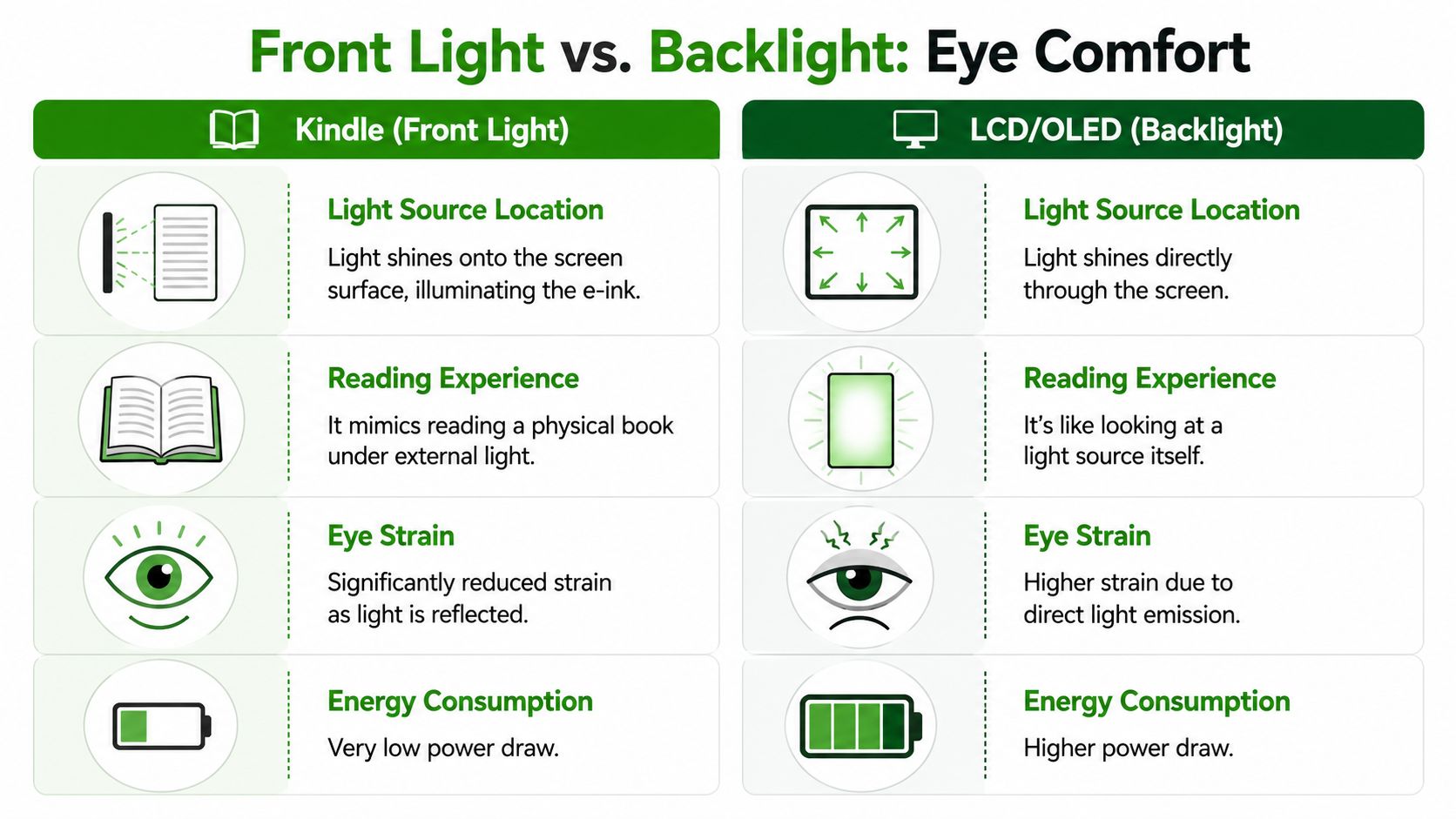
On a phone or tablet, the screen is producing the image and sending light toward your eyes. On a Kindle, the screen itself is reflective, and the built-in front light shines across the surface so you can read the text the same way you read ink on paper. The screen is still electronic, but the experience is closer to looking at a page than looking into a beam of light.
That helps explain why Kindle reading often feels calmer. Your eyes are reading reflected light from a stable page, not a bright panel designed for video, apps, and constant motion.
If staying with a book is hard, comfort matters as much as discipline. A device that feels quieter can make it easier to settle in, much like adjusting your environment with these tips on how to focus while reading.
Why the lighting design changes the reading experience
The front light on a Kindle is there to illuminate the page, not to make the page itself glow. That design choice connects directly to real reading benefits.
In bright sunlight, a Kindle usually stays readable because the screen uses ambient light well instead of fighting it. In a dark room, the front light adds just enough illumination to keep the text clear without turning the whole display into a luminous rectangle. USC Illumin's explanation of e-ink technology notes that E Ink relies on ambient light for readability and uses a front light rather than a backlight, which is a big reason these screens feel more natural for long reading sessions.
There is a tradeoff. E Ink responds more slowly than a tablet screen because it has to physically rearrange pigment particles. For novels, essays, and other mostly static pages, that trade is usually a good one. You give up flashy motion and get a steadier reading surface.
| Reading situation | Kindle front-lit feel | Tablet backlit feel |
|---|---|---|
| Morning by a window | Closer to paper | More screen-like |
| Long novel session | Gentler, steadier page | Brighter, more active display |
| Bright outdoor light | Usually easier to read | Often more glare-prone |
| Video or scrolling apps | Poor fit | Excellent |
Why this matters for your reading habit
The true win is not a spec on a product page. It is what happens after twenty minutes, then forty, then a full chapter.
A comfortable screen lowers resistance. You are more likely to keep reading when the device fades into the background and lets the words take over. That is the "how" turning into the "why." Front lighting, reflective text, and a less aggressive visual feel all support longer sessions, less friction, and a reading routine you can maintain.
For a device built around books, that is the point.
E Ink vs LCD A Head-to-Head Screen Comparison
E Ink and LCD/OLED screens aren't competing to do the same job equally well. They're built around different priorities.
A Kindle screen is a specialist. A tablet screen is a generalist. Once you judge them by the tasks they were designed for, the tradeoffs become much clearer.
Where E Ink wins
The biggest strength of E Ink is that it behaves like a reading surface first. As noted in the earlier section, reflective design helps in bright environments and supports a calmer reading feel. That gives E Ink a practical edge when you're reading novels, essays, or long documents.
E Ink also avoids trying to be flashy. That matters. For book reading, you don't need saturated color, rapid animation, or buttery scrolling. You need stable text, low distraction, and a screen that doesn't fight the room you're in.
If your main goal is to read words for an hour, a screen optimized for video is solving the wrong problem.
Where LCD and OLED still win
LCD and OLED displays are much better when the content changes rapidly. They're built for video, games, multitasking, web browsing, and rich color. If you want one device to handle everything, a tablet or phone makes more sense.
That's also why a Kindle can feel slow if you expect tablet behavior. It isn't broken. It's tuned for a different workload.
Here's the side-by-side view.
E Ink vs LCD OLED Screen Technology
| Feature | E Ink (Kindle) | LCD / OLED (Tablet) |
|---|---|---|
| Readability in bright sunlight | Strong, because the display is reflective | Often harder, especially with glare |
| Eye comfort for long reading | Often feels gentler for extended text reading | Can feel harsher during long sessions |
| Power use while showing static text | Very low | Higher because the screen stays actively lit |
| Motion handling | Slow for animation and video | Fast and smooth |
| Color and visual richness | Limited compared with mainstream tablets | Much stronger for color-rich content |
| Best use case | Books and long-form reading | Mixed media and all-purpose computing |
Choosing by task, not by hype
If you mostly read books, E Ink's limitations are often irrelevant. You're not asking the screen to play movies. You're asking it to disappear so the story can take over.
If you want one device for reading, streaming, browsing, and fast app switching, LCD or OLED is the better fit.
The right question isn't “Which screen is better?” It's “Better for what?” For reading, Kindle's screen technology is unusually purpose-built.
The Secret to a Kindle's Epic Battery Life
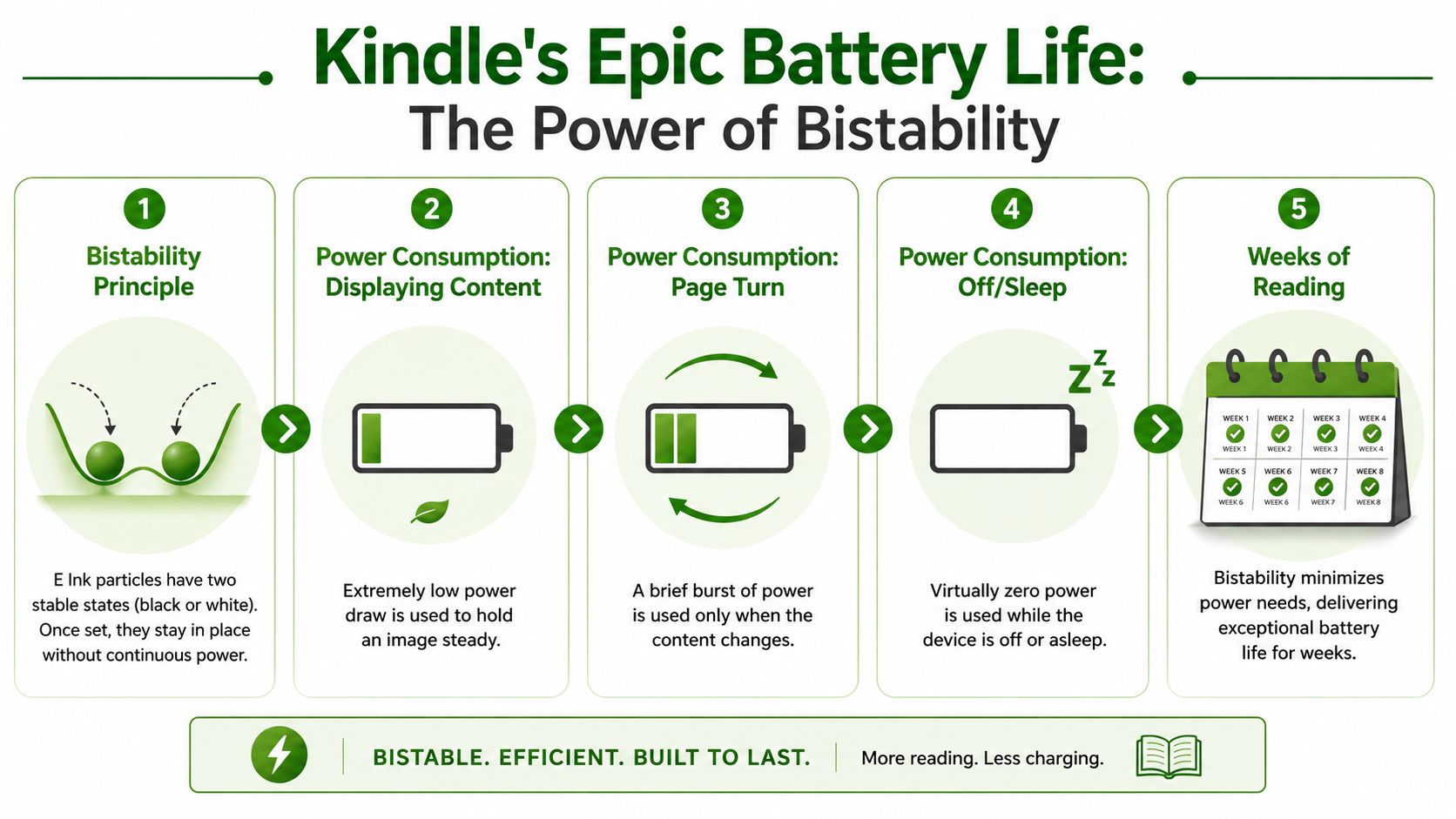
A Kindle's battery life feels almost suspicious the first time you use one. You charge it, read for days, come back, and it still isn't begging for a cable. That isn't magic. It comes from a property called bistability.
What bistability actually means
Bistability means the display can hold an image in place without needing much power to keep it there.
In plain language, once the particles are arranged to show a page, they mostly stay put. The Kindle mainly needs power when you change the page, not while you're reading it. According to this historical overview of e-ink and Kindle development, that low-power behavior was a core advantage behind e-ink, and it helped e-readers become a mass-market category after the first Amazon Kindle launched in 2007. The same source notes later industry reporting that 12-inch e-ink devices were 36 times more efficient than LCD devices of the same size.
That's a huge clue to the reading experience. Books spend most of their time showing a static page.
Why this changes daily use
A phone display has to stay active constantly. A Kindle can relax.
Think about how you read. You open a page, spend a while there, then tap once to move on. From the battery's perspective, that pattern is ideal for E Ink. The screen does a burst of work, then mostly rests while you read.
Here's what that means in practice:
- Less charging friction: You don't have to treat reading like another battery management task.
- Better grab-and-go behavior: The device is more likely to be ready when you want it.
- More appliance-like use: It feels dependable in the way a book feels dependable.
- Fewer interruptions: Long battery life supports reading flow.
A Kindle saves energy because reading is mostly stillness, and the display is designed to take advantage of that.
The battery story also explains why Kindles aren't ideal for video or constant motion. Frequent image changes mean frequent particle rearrangement. That's not where E Ink shines.
What This Tech Means for Your Reading Habit
All of these engineering choices point in the same direction.
The microcapsules make a reflective page-like image instead of a glowing one. The refresh system keeps text clean, even if it sometimes flashes. The lighting approach supports reading rather than turning the device into a bright entertainment panel. Bistability keeps the battery from becoming another obstacle.
None of that matters because it's clever. It matters because it removes friction.
When a device works well in sunlight, feels calm during long sessions, and doesn't need constant charging, reading becomes easier to repeat. That's what habits need. Not excitement. Not novelty. Just fewer reasons to stop.
If you're trying to build a steady reading routine, it helps to think less about gadgets and more about environment design. A Kindle is useful because it creates a low-distraction, low-maintenance reading environment. Pair that with a realistic target, and consistency gets much easier. If you're setting that target now, this guide on how many pages a day you should read is a good place to start.
The best part of Kindle technology is that it respects the activity. It doesn't try to turn reading into something else. It makes the page easier to live with, day after day.
If you want help turning good intentions into a real reading streak, Habit Huddle gives you a simple way to stay accountable. You can join a small group, check in daily, and keep your reading habit moving even on busy days.
Ready to Build Habits With Friends?
Stop failing alone. Join thousands using the #1 habit tracker with friends for real accountability and lasting results.
Prefer mobile? App Store · Google Play
Related Guides
More Habit Huddle articles on building habits with accountability.

Family Habit Tracker App: 8 Best Picks by Age, and How to Make It Stick (2026)
Family habit tracker apps compared by age: Joon, Family Rewards, Family Checklist, Kinly, Habit+ Family, HabitShare, Habitica, and Habit Huddle. Plus the hab...

Gamified Habit Tracker: 7 Apps Compared by What the Game Rewards (2026)
Gamified habit trackers compared: Habitica, Finch, Forest, Streaks, Habits Garden, HabitForge, and Habit Huddle, by what the game rewards, what free gets you...

Running Accountability App: 8 Picks Compared (Stakes, Streaks, and Friends)
Eight running accountability apps compared: Strava, Nike Run Club, Runkeeper, Oath, RunMatch, RunHawk, StickK, and Habit Huddle, with prices, how runs are ve...